Adobe Firefly is the best AI tool for concept art: it lists sketch-to-image, style transfer, Generative Fill in Photoshop, Boards and Custom Models, and Adobe says its model outputs are safe for commercial use. Leonardo.Ai is #2 with a model named Concept Art, and Midjourney is #3 for fast look development.
Firefly Standard is US$9.99 per month with 2,000 generative credits and Firefly Pro is US$19.99 with 4,000; the page also lists a free plan with daily generations
Concept artists who want sketch-to-image, Photoshop editing and a clear commercial-use statement
Free is $0 with 100 compute units a day; Basic is listed at $9 and $5 per month with 5,000 units, depending on the billing toggle, which the page does not explain
Artists who iterate live on rough shapes and want many models under one subscription
Free and open source; the page lists no plans or prices and the former officially hosted Invoke.ai platform has been shut down
Artists comfortable running their own GPU who want a layered canvas for painting over AI output
Pick by what you want
Best overall
Adobe Firefly
Best for game art teams
Scenario
Best for live sketching
Krea
Best free and open source
Invoke
Best for chat-style refining
ChatGPT Images
The ranking
1
Adobe Firefly
Answrs VerdictThe most complete concept-art toolkit with the clearest commercial terms.
Price: Firefly Standard is US$9.99 per month with 2,000 generative credits and Firefly Pro is US$19.99 with 4,000; the page also lists a free plan with daily generationsCommercial use: Adobe says outputs from Adobe Firefly AI models are safe for commercial use; for partner models, you are responsible for deciding whether content is appropriate for your projectSketch and references: Image-to-image, sketch-to-image and image style transfer are listed as features, with Generative Fill in Photoshop among the standard image featuresBoards: Firefly Boards is an infinite-canvas workspace to collect, collaborate and remix ideas, with mood boards and storyboardsCustom Models: Train a model on your own images to capture your signature style and generate consistent concepts and variations
Firefly lists image-to-image, sketch-to-image and image style transfer, with Generative Fill in Photoshop among its standard image features. Boards is an infinite canvas for mood boards and storyboards, and Custom Models trains on your own images to capture your style. Adobe says outputs from Firefly models are safe for commercial use. Standard is US$9.99 per month with 2,000 generative credits and Pro is US$19.99 with 4,000.
Go ifConcept artists who want sketch-to-image, Photoshop editing and a clear commercial-use statement
Skip ifYou want a single flat fee with no credit allowance to track
Why #1 over #2: It pairs sketch input and Photoshop editing with the clearest commercial-use statement, which Leonardo.Ai’s ownership terms split between paid and free plans.
2
Leonardo.Ai
Answrs VerdictStrong value, with a model literally named Concept Art.
Price: Free is $0 with 150 fast tokens per day; Essential is listed at $12 per month ex. tax with 8,500 tokens and Premium at $30 with 25,000Concept Art model: A model named Concept Art is among the image models included in unlimited relaxed generation on PremiumOwnership: Paid subscribers retain full ownership and intellectual property rights of generated images and can use them for commercial projectsFree plan terms: Free users get a non-exclusive, royalty-free licence to use generated content for commercial purposes, while Leonardo.Ai holds rights to the imagesPrivate creations: Essential and above list private creations access, and the Free plan lists public
Leonardo.Ai lists a model named Concept Art among its image models. Free is $0 with 150 fast tokens per day, Essential is listed at $12 per month ex. tax with 8,500 tokens and Premium at $30 with 25,000. Paid subscribers retain full ownership and can use images commercially, while Free users get a non-exclusive, royalty-free licence.
Go ifGame and character artists who want many models, including a Concept Art one, and paid-plan ownership
Skip ifYou need your free-plan images to be private or solely yours
Why #2 over #3: It has a model literally named Concept Art and paid-plan ownership, where Midjourney attaches a revenue rule to company use.
3
Midjourney
Answrs VerdictA leading look-development tool, with a revenue-based licence rule to know.
Price: Basic is $10 per month ($8 billed yearly) and Standard is $30 per month; Pro is $60 and Mega is $120Fast time: Fast GPU time is 3.3 hr per month on Basic, 15 hr on Standard, 30 hr on Pro and 60 hr on MegaCommercial terms: Subscribers can use images and videos in just about any way they want, but a company making more than $1,000,000 USD in gross revenue per year must buy Pro or MegaEditor: The Basic plan lists Editor use on uploaded images, and the help center documents Style Reference, Omni Reference and PersonalizationPrivacy: The mode that keeps images and videos private is only available on the Pro and Mega plans
Midjourney plans are Basic at $10 per month ($8 billed yearly), Standard at $30, Pro at $60 and Mega at $120, with fast GPU time of 3.3 hr on Basic up to 60 hr on Mega. Subscribers can use images in just about any way they want, but a company making more than $1,000,000 USD in gross revenue per year must buy Pro or Mega. The help center documents Style Reference, Omni Reference and Personalization.
Go ifArtists who want fast, stylish exploration and are fine working through its web and help-center tools
Skip ifYou work for a company over the revenue limit and do not want to pay for Pro
Why #3 over #4: It is a leading look-development tool with a clear price ladder, where Scenario is aimed at studio pipelines instead.
4
Scenario
Answrs VerdictBuilt for game-art pipelines, with explicit commercial terms.
Price: Starter is $15 per month with 1,500 credits, Pro is $45 with 5,000 and Max is $75 with 10,000; Free has 50 creditsCommercial use: All paid plans include a full commercial license and you own what you create, while Free plan outputs are for personal and evaluation use onlyCustom models: Train a model on your own art when a project needs a style no reference can holdConcept art and assets: Image tools generate, edit, upscale and split images into layers, and one image can become a textured 3D modelGame workflows: Save a chain as a workflow so anyone on the team can run it in one click, such as turning item names into a matching icon set
Scenario lets you train a model on your own art, generate, edit and upscale images, split them into layers and turn one image into a textured 3D model. Workflows can be saved so anyone on the team runs them in one click. Starter is $15 per month with 1,500 credits, Pro is $45 with 5,000 and Max is $75 with 10,000. All paid plans include a full commercial license; Free is personal and evaluation use only.
Go ifGame studios that need consistent concept art and assets across a team
Skip ifYou only want a casual image generator for one-off pictures
Why #4 over #5: It is built for repeatable game-art pipelines, where Krea focuses on live iteration.
5
Krea
Answrs VerdictThe best live, sketch-style iteration tool here.
Price: Free is $0 with 100 compute units a day; Basic is listed at $9 and $5 per month with 5,000 units, depending on the billing toggle, which the page does not explainCommercial use: Commercial use is listed as included on the paid plansRealtime Canvas: Turn easy-to-control primitives into photorealistic images in less than 50msStyle control: LoRA training and moodboards let you teach Krea a look or steer style with referencesModels: One subscription gives access to many models, including Krea 3, Flux, Gemini, Ideogram and Runway
Krea’s Realtime Canvas turns easy-to-control primitives into photorealistic images in less than 50ms, and LoRA training and moodboards help set a look. One subscription covers many models, including Krea 3, Flux, Gemini, Ideogram and Runway. Free is $0 with 100 compute units a day, and Basic is listed at $9 and $5 per month with 5,000 units, depending on a billing toggle the page does not explain.
Go ifArtists who iterate live on rough shapes and want many models under one subscription
Skip ifYou need to know exactly which billing period each listed price covers
Why #5 over #6: It is the quickest for live, sketch-style iteration, where ChatGPT Images works through conversation.
6
ChatGPT Images
Answrs VerdictThe easiest way to go from words to a first concept.
Price: Free is $0 per month with limited image creation; Go is $8, Plus is $20 and Pro is $100, with unlimited and faster image creation on ProMulti-turn refinement: OpenAI says you can refine images through natural conversation, and for a video game character the appearance stays coherent across iterationsReference images: It can transform uploaded images or use them as visual inspirationCurrent model: The article says it introduced 4o image generation and points to ChatGPT Images 2.5 as the current image experienceCommercial use: Not published on the pages we read
OpenAI says you can refine images through natural conversation, that a video game character’s appearance stays coherent across iterations, and that it can use uploaded images as visual inspiration. The article points to ChatGPT Images 2.5 as the current experience. Free is $0 with limited image creation; Go is $8, Plus is $20 and Pro is $100.
Go ifAnyone who wants to describe a scene in chat and refine it step by step
Skip ifYou need a stated commercial-use policy on the page, which these pages do not give
Why #6 over #7: It refines concepts through chat, where Gemini adds a visible watermark to outputs.
7
Gemini Image Generation
Answrs VerdictA capable free option, held back by the visible watermark.
Price: Nano Banana 2 is free; Google AI Plus is $4.99 per month and AI Pro is $19.99, with higher generation limits on paid plansCharacter consistency: Maintain a character’s appearance across generated imagesEditing: Fine-tune lighting, camera angles and aspect ratios, and shift a scene from day to nightReference style: Apply the texture, color or style from a reference photo to your subjectWatermarks: Outputs include an invisible SynthID watermark and a visible watermark to show they are AI-generated
Gemini image generation can maintain a character’s appearance across images, fine-tune lighting and camera angles, and apply the style of a reference photo. Nano Banana 2 is free; Google AI Plus is $4.99 per month and AI Pro is $19.99. Outputs carry an invisible SynthID watermark and a visible watermark.
Go ifFree or low-cost concept iterations with strong character and lighting edits
Skip ifYou need images without a visible watermark
Why #7 over #8: It is free with strong character and lighting edits, where Stable Diffusion has no published price.
8
Stable Diffusion
Answrs VerdictThe most controllable option, with a clear revenue-based licence.
Price: Not published on the pages we read; the licence page covers commercial terms insteadCommercial use: Core Models are free for commercial use by organizations under USD $1M in annual revenue, with an Enterprise License required above thatModels: Stable Diffusion 3.5 comes as Large for professional use at 1 megapixel, Turbo that generates in four steps, and Medium for consumer hardwareEditing and control: Via the API: inpaint, outpaint and remove background, plus Sketch, Structure and Style controlAccess: Self-hosted licence, the Stability AI API, cloud partners and the Stable Assistant web platform
Stable Diffusion 3.5 comes as Large for professional use at 1 megapixel, Turbo that generates in four steps, and Medium for consumer hardware. API tools include inpaint, outpaint, remove background, and Sketch, Structure and Style control. Core Models are free for commercial use by organizations under USD $1M in annual revenue. A price is not published on the pages we read.
Go ifTechnical artists who want control, self-hosting and sketch or structure guidance
Skip ifYou want a polished app with a published subscription price
Why #8 over #9: It offers more control and self-hosting than FLUX’s tiered licences, with a simple revenue-based commercial rule.
9
FLUX
Answrs VerdictA strong engine to build on rather than a finished concept-art app.
Price: The pricing calculator shows $0.048 per image at 768 × 768 resolution, though the page does not say which model that applies toModels: The pricing page lists FLUX 3 Image, FLUX 3 Image Klein and FLUX.2 [pro], [flex], [max] and [klein] among its modelsOpen weights: Run FLUX models on your own infrastructure with control over deployment, fine-tuning and customization, with a license requiredPlayground: A browser-based playground lets you experiment with FLUX models with no codeLicence tiers: Enterprise lists permissive commercial use; Builder, Platform and Professional tiers include fine-tuning and LoRA rights
FLUX models can be run on your own infrastructure with a license, or tried in a no-code browser playground. The pricing page lists FLUX 3 Image, FLUX 3 Image Klein and FLUX.2 models, and its calculator shows $0.048 per image at 768 × 768 resolution without naming the model. Enterprise lists permissive commercial use.
Go ifDevelopers and studios building their own image pipelines on a strong open-weights family
Skip ifYou want a ready-made art app with sketch and layer tools
Why #9 over #10: It is a strong engine to build on, where Invoke is a ready-made canvas app.
10
Invoke
Answrs VerdictThe best free canvas for hands-on artists with their own hardware.
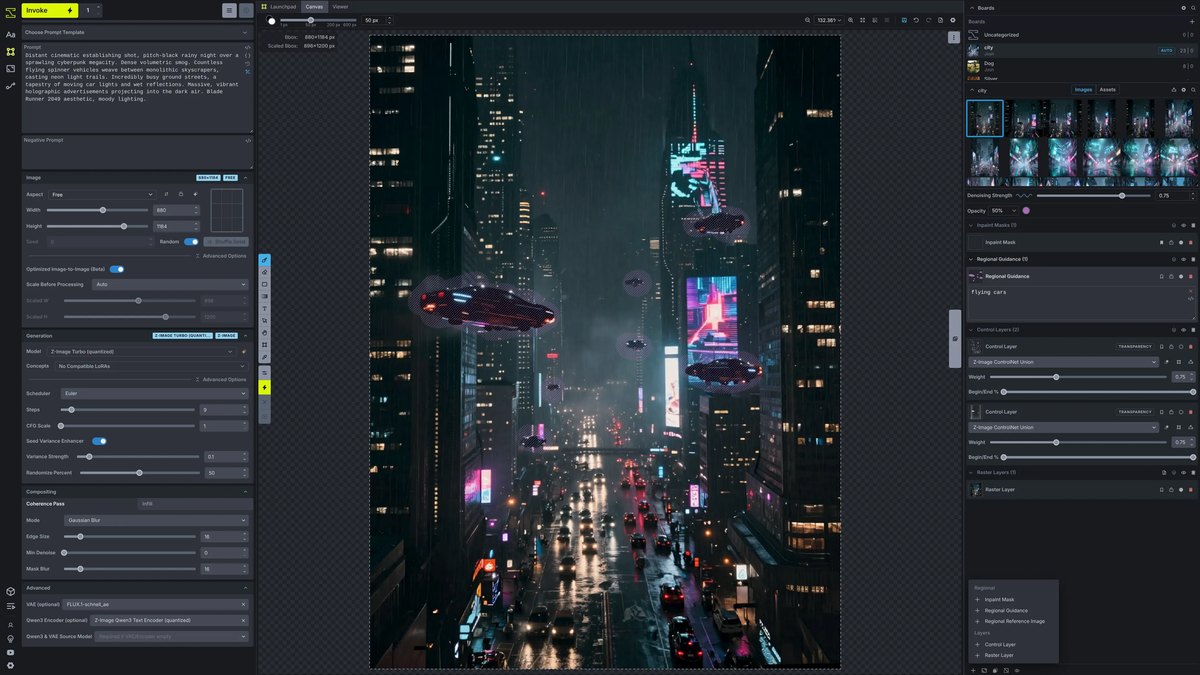
Price: Free and open source; the page lists no plans or prices and the former officially hosted Invoke.ai platform has been shut downUnified canvas: Layer-based editing for drawing, painting and sketching, with each layer manipulated independentlyWorkflows: A node-based visual graph backend for reproducible pipelinesControl: ControlNet guidance with depth maps, edges and poses, plus a Model Manager for checkpoints, LoRAs and moreModels and license: Supports Flux, SDXL and SD 1.5 and is Apache 2.0 licensed; the page does not address commercial use of outputs
Invoke is a free, open-source, Apache 2.0 creative engine with a layer-based canvas for drawing, painting and sketching, node-based workflows and ControlNet guidance. It supports Flux, SDXL and SD 1.5 models. The page lists no prices, does not address commercial use of outputs, and says the former officially hosted Invoke.ai platform has been shut down.
Go ifArtists comfortable running their own GPU who want a layered canvas for painting over AI output
Skip ifYou want a hosted service, since the official hosted platform has shut down
How we ranked these
We ranked tools by how directly their own pages show concept-art workflow features such as sketch and reference input, style control and editing, then by stated commercial-use terms and cost to start, using official feature, pricing and licence pages. Ideogram and Recraft were left out because we did not read pages showing a concept-art workflow, and several vendors did not publish prices or commercial terms on the pages we read; we say so rather than guess. Leonardo.Ai and Midjourney prices were read from each vendor’s pricing page; billing terms for Leonardo.Ai and Krea are not fully explained there. This is a general guide, not legal advice on image rights. Facts are taken from each maker's own published information; check the official site before you buy.
Questions people ask
What is the best AI for concept art?
Adobe Firefly ranks first here: sketch-to-image, style transfer, Generative Fill in Photoshop, Boards and Custom Models, with Adobe saying its own model outputs are safe for commercial use. Leonardo.Ai and Midjourney follow.
Can I use AI concept art commercially?
It depends on the tool. Scenario says all paid plans include a full commercial license, Leonardo.Ai says paid subscribers own their images, Midjourney requires Pro or Mega for companies making more than $1,000,000 USD a year, and Stability AI says Core Models are free for commercial use under USD $1M in annual revenue.
Are there free AI tools for concept art?
Yes. Adobe Firefly lists a free plan, Leonardo.Ai Free is $0 with 150 fast tokens per day, Krea Free is $0 with 100 compute units a day, Gemini’s Nano Banana 2 is free, and Invoke is free and open source.
Which tool is best for game concept art?
Scenario is built for game pipelines with custom model training, reusable workflows and a full commercial license on paid plans. Leonardo.Ai also lists a model named Concept Art.
Listed price per month of an entry paid plan in this list (billing terms vary, see picks) at a glance
Google AI Plus4.99 USD
ChatGPT Go8 USD
Adobe Firefly Standard9.99 USD
Midjourney Basic10 USD
Leonardo Essential12 USD
Scenario Starter15 USD
Listed price per month of an entry paid plan in this list (billing terms vary, see picks), as published by each maker. Picks without a published figure are left off.