Yes, you can upscale for free: Upscayl’s homepage calls its desktop app “Free and Open Source”, so it ranks #1. Krea Enhancer is #2 with a $0 plan, and ImgLarger is #3 with 100 credits per month. Topaz Gigapixel states no free plan.
No free plan or trial is stated on Topaz Labs’ Gigapixel or pricing pages; both list paid subscriptions
Photographers and print shops who will pay for desktop software
Pick by what you want
Best free overall
Upscayl Desktop
Best free plan with a path to 22K
Krea Enhancer
Best monthly free credits
ImgLarger
Best for anime and drawings
Bigjpg
Best for print sizes
Let's Enhance Upscaler
Best paid desktop software
Topaz Gigapixel Upscaler
The ranking
1
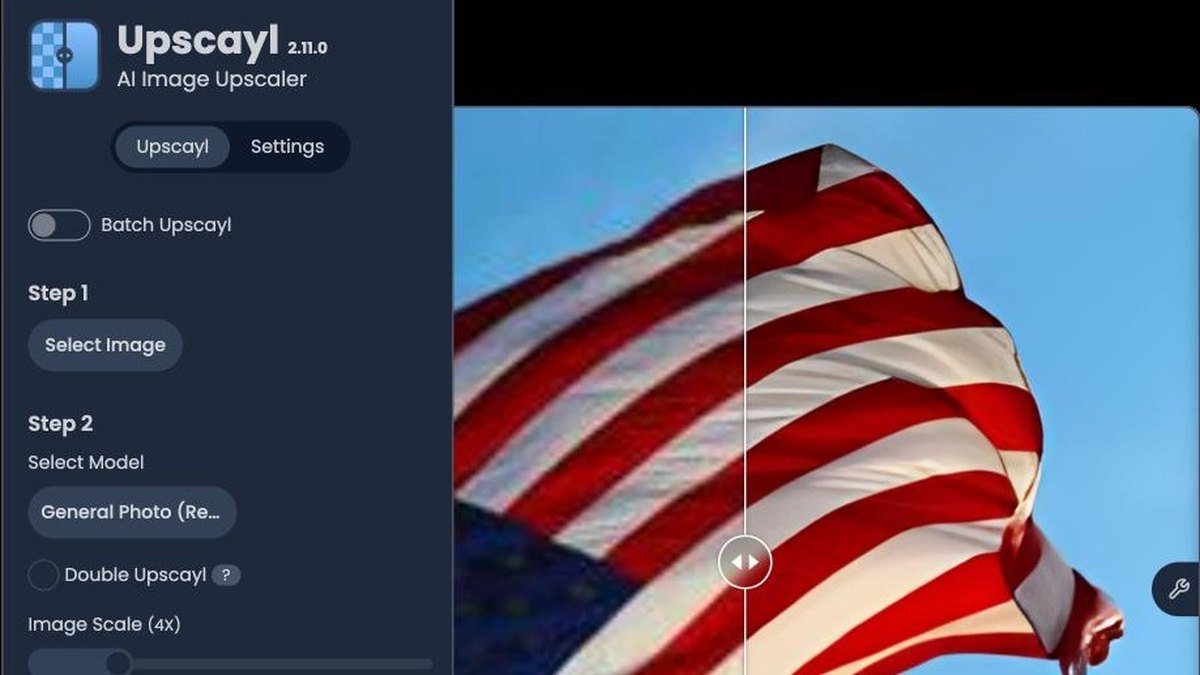
Upscayl Desktop
Answrs VerdictThe only pick whose own site calls the desktop app free and open source.
Free?: Yes. Upscayl’s homepage says “Free and Open Source” and “Download once, forever yours.”Upscaling: AI-powered upscaling up to 16xPlatforms: Upscayl Desktop for Linux, MacOS and WindowsCloud option: Upscayl Cloud has a Free Trial at $0 with 10 credits included; the Pro Plan is $24.99 for 300 credits per monthPrice: Desktop price: none listed; the homepage calls it free
Upscayl’s homepage says “Free and Open Source” and “Download once, forever yours.” It advertises AI-powered upscaling up to 16x and runs as a desktop app on Linux, MacOS and Windows. A separate Upscayl Cloud has a Free Trial at $0 with 10 credits, and a Pro Plan at $24.99 for 300 credits per month. The desktop app itself lists no price.
Go ifAnyone who wants unlimited upscaling on their own computer without paying
Skip ifYou want a browser tool with no download
Why #1 over #2: It is the only tool here whose own site calls the desktop app free and open source, where Krea and ImgLarger cap the free plan.
2
Krea Enhancer
Answrs VerdictA real free plan, with 2K upscaling and a route up to 22K.
Free?: Yes. The Free plan is $0 per month with 100 units / day, and includes upscaling up to 2K resolution with basic upscaling modelsUpscaling: Upscale images up to 22K or videos up to 8K resolution, and add new detailsPaid upscalers: Paid plans add upscalers, including Topaz Standard, that support outputs up to 22KPositioning: Krea calls Enhancer an advanced AI upscaler and enhancer for extremely detailed hi-res images and videosPrice: Paid plan prices are on the Krea pricing page
Krea’s Free plan is $0 per month with 100 units / day and includes upscaling up to 2K resolution with basic models. Krea says Enhancer can upscale images up to 22K or videos up to 8K and add new details, and that paid plans add upscalers, including Topaz Standard, for outputs up to 22K. Paid prices sit on Krea’s pricing page.
Go ifCreators who want a free daily allowance and a path to very large outputs
Skip ifYou need unlimited free upscaling at full size
Why #2 over #3: It gives a daily free allowance with a path to 22K, while ImgLarger’s Free plan stops at 2X and a 1024px input side.
3
ImgLarger
Answrs VerdictA clear free tier with a stated monthly credit count.
Free?: Yes. The Free plan is $0 per month with 100 credits per month; it scales up to 2X with input max side up to 1024pxUpscaling: Increase image resolution by 2x or 4x; enlarge images by 2x, 4x, or 8xPaid plans: Premium is $9.99 per month with 2000 credits per month and scale up to 8X; Business is $19.99 per month with 6000 credits per monthCost per image: Each processed or downloaded image costs 1 creditUpload limit: Uploaded images must be under 10MB in size and 4000 pixels on one side
ImgLarger’s Free plan is $0 per month with 100 credits per month, scaling up to 2X on inputs up to 1024px on the longest side. Each processed or downloaded image costs 1 credit. Premium is $9.99 per month with 2000 credits and scale up to 8X, and Business is $19.99 per month with 6000 credits. Uploads must be under 10MB and 4000 pixels on one side.
Go ifOccasional small jobs that fit inside a monthly free credit allowance
Skip ifYour source images are larger than 1024px on the longest side and you want to stay free
Why #3 over #4: It states a bigger free monthly count than Bigjpg’s 20 images, but with a smaller 2X scale.
4
Bigjpg
Answrs VerdictA simple free tier that gets you 4x.
Free?: Yes. The free plan covers 20 images per month, uploads up to 5MB, and a 4x maximum enlargementTechnology: Bigjpg calls itself an AI Super-Resolution lossless image enlarging tool using Deep Convolutional Neural NetworksFree limits: Free processing is slow and runs on shared servers; offline, parallel, and batch enlarging are not includedPaid plans: Basic is $6 USD for 2 months with 500 images per month; Standard is $12 USD for 6 months; Premium is $22 USD for 12 monthsPaid scale: Paid plans offer 50MB uploads and 16x enlargement
Bigjpg calls itself an AI Super-Resolution lossless image enlarging tool using Deep Convolutional Neural Networks. The free plan covers 20 images per month, uploads up to 5MB and 4x enlargement, with slow processing on shared servers. Paid plans start at $6 USD for 2 months and add 50MB uploads and 16x enlargement.
Go ifAnime art, illustrations and drawings, up to 4x, a few at a time
Skip ifYou need speed or batches without paying
Why #4 over #5: Its free plan reaches 4x, which is twice the 2X scale of ImgLarger’s Free plan.
5
Let's Enhance Upscaler
Answrs VerdictA free trial, but free results carry a watermark.
Free?: Yes. The pricing page lists a Free plan, no credit card needed, with 10 free credits on signing up and upscaling up to 8 megapixelsWatermark: Images enhanced with free credits are watermarked; after you buy a subscription or pay-as-you-go bundle you can download them again watermark-freeUpscaling: The upscaler increases resolution up to 16x, and Let’s Enhance advertises up to 512 megapixelsPaid plans: Starter is $9 per month when billed annually or $12 per month if billed monthly; Starter upscales up to 256 megapixelsUpload limit: Input images can be up to 64 megapixels or 50 MB for all plans
Let’s Enhance lists a Free plan, no credit card needed, with 10 free credits on sign-up and upscaling up to 8 megapixels. Images enhanced with free credits are watermarked until you buy a subscription or bundle. It advertises up to 512 megapixels and 16x; Starter is $9 per month billed annually or $12 per month billed monthly.
Go ifPrint-size enlargements where you want to try it free first
Skip ifYou need clean, unmarked results without paying
Why #5 over #6: It handles far bigger files than Bigjpg’s 5MB free limit, but free results carry a watermark that Fotor says it avoids.
6
Upscale.media
Answrs VerdictEasy to try; the free allowance is small.
Free?: Yes, with limits. The Free Plan gives 3 free credits and 3 free downloads every monthUpscaling: AI-powered 2x, 4x, or 8x upscalingPersonal use: The site says Upscale.media is free of cost for personal usePaid plans: Subscription is $69.99 billed annually at $0.01 per credit; credit packs start at 60 credits for $7.99Input size: At 8X, input is capped at 1,250 x 1,250 px for guests and 2,500 x 2,500 px for logged-in users
Upscale.media offers AI-powered 2x, 4x, or 8x upscaling and says it is free of cost for personal use. Its Free Plan gives 3 free credits and 3 free downloads every month. A subscription is $69.99 billed annually at $0.01 per credit, and 60 credits cost $7.99. At 8X the input is capped at 1,250 x 1,250 px for guests.
Go ifQuick one-off enlargements in a browser
Skip ifYou need a larger monthly free allowance
Why #6 over #7: It reaches 8x, but its 3 free credits per month are far fewer than ImgLarger’s 100.
7
Fotor AI Image Upscaler
Answrs VerdictFree at 2x, paid at 4x.
Free?: Yes, with limits. Free users can download 2× results, but 4× downloads require a paid membershipUpscaling: Upscale an image up to 4x in the browser; download in 2x or 4x resolutionWatermark: Fotor says you can enlarge images without added watermarksFree tier: The Basic tier is listed as “Free forever” with limited free creditsPrice: Pro price is not shown on the Fotor pricing page we could read
Fotor’s upscaler enlarges images up to 4x in the browser. The page says free users can download 2× results, while 4× downloads require a paid membership. Fotor says you can enlarge images without added watermarks. The pricing page lists the Basic tier as “Free forever” with limited free credits and does not show the Pro price.
Go ifPeople who already use Fotor’s editor and want 2x for free
Skip ifYou want 4x output without a paid membership
Why #7 over #8: Its free 2× downloads match ImgLarger’s free 2X, but it states no monthly free credit count.
8
Pixelcut
Answrs VerdictFree with an unstated limit; unlimited on Pro.
Free?: Yes, with limits. The Free plan is $0 and lists “Limited Upscale” and “Free export without watermark”Upscaling: High quality upscaling up to 16x resolution, choose from a range of models including TopazPaid plan: Pro is $10, or $8 per month billed yearly, and lists “Unlimited Upscale”Fast Upscaler: The feature comparison lists the Fast Upscaler as “Limited” on the Free planFree allowance: How much upscaling the free plan allows is not published
Pixelcut’s homepage lists upscaling up to 16x resolution with a choice of models including Topaz. The Free plan is $0 and lists “Limited Upscale” and “Free export without watermark”. Pro is $10, or $8 per month billed yearly, with “Unlimited Upscale”. Pixelcut does not publish how much upscaling the free plan allows.
Go ifProduct photos for stores and social posts, with the upscaler beside the background remover
Skip ifYou need to know the free upscale limit before you start
Why #8 over #9: It states up to 16x where Fotor stops at 4x, but it does not say how much you get free.
9
VanceAI Image Upscaler
Answrs VerdictA 10-credit trial, then paid.
Free?: Limited trial only. VanceAI offers “Try free with 10 credits” on its web appCost per image: The AI Image Upscaler costs 1 credit (2×), 2 credits (4×), or 3 credits (8×)Paid plans: Starter is $15 per month with 260 credits (200 plus 60 free)Desktop: VanceAI for PC is $39.90 for 1 month, $99.90 for 1 year, or $129.90 for LifetimeCloud client: VanceAI Cloud is listed as a free lightweight desktop client for AI video and image processing
VanceAI offers “Try free with 10 credits” on its web app. The AI Image Upscaler costs 1 credit at 2×, 2 credits at 4×, or 3 credits at 8×. Starter is $15 per month with 260 credits (200 plus 60 free). VanceAI for PC costs $39.90 for 1 month, $99.90 for 1 year, or $129.90 for Lifetime.
Go ifPeople who want to test a few images and may later want a desktop app
Skip ifYou expect a free plan that renews each month
Why #9 over #10: It spells out the credit cost per scale, but it offers a one-time 10-credit trial where Krea and ImgLarger renew free allowances.
10
Topaz Gigapixel Upscaler
Answrs VerdictThe strongest pick for quality, and the one with no free plan stated.
Free?: No free plan or trial is stated on Topaz Labs’ Gigapixel or pricing pages; both list paid subscriptionsUpscaling: Image upscaling up to 16x pixels; Topaz also says it can upscale almost any image 6xPersonal price: $149 per year, or $19 per month with an annual commitment, or $29 per monthPro price: Gigapixel Pro is $499 per yearPositioning: Topaz calls Gigapixel the industry-leading image upscaler
Topaz Gigapixel advertises image upscaling up to 16x pixels and calls itself the industry-leading image upscaler. Neither its Gigapixel page nor its pricing page states a free plan or trial. Personal is $149 per year, $19 per month with an annual commitment, or $29 per month; Gigapixel Pro is $499 per year.
Go ifPhotographers and print shops who will pay for desktop software
Skip ifYou want to upscale for free
How we ranked these
You searched whether upscaling is free, so we ranked on what each tool’s own site says you can do without paying, then on what the paid plan adds. Every free limit, price and scale in this list comes from the vendor’s own pages; we did not run side-by-side image tests, so none of this rates output quality. Free allowances change often, so check the linked page before you rely on one. We checked Adobe Photoshop’s Generative Upscale but could not read its own pages, so it is not on the list; Magnific is left off because its own pricing page does not describe a free plan or upscaling limits. Facts are taken from each maker's own published information; check the official site before you buy.
Questions people ask
Is there a free AI image upscaler?
Yes. Upscayl’s homepage calls its desktop app “Free and Open Source”. Krea’s Free plan is $0 per month with 100 units / day and 2K upscaling, and ImgLarger’s Free plan gives 100 credits per month.
Which AI upscalers have no free plan?
Topaz Labs’ Gigapixel and pricing pages list paid subscriptions only and state no free plan or trial. VanceAI offers a 10-credit trial rather than a renewing free plan.
Can I upscale an image for free without a watermark?
Fotor says you can enlarge images without added watermarks and download 2× for free. Pixelcut’s Free plan lists “Free export without watermark”. Let’s Enhance watermarks images enhanced with free credits.
How big can the free tiers enlarge an image?
It varies. Bigjpg’s free plan is limited to 4x, ImgLarger’s Free plan scales up to 2X, Fotor gives 2× downloads free, and Let’s Enhance’s Free plan upscales up to 8 megapixels.
Largest upscale factor each site states for the tool, in x (Bigjpg’s 16x and ImgLarger’s 8x are on paid plans; Fotor’s 4x download needs a paid membership) at a glance
Fotor AI Image Upscaler4 x
ImgLarger8 x
Upscale.media8 x
VanceAI Image Upscaler8 x
Bigjpg16 x
Let's Enhance Upscaler16 x
Pixelcut16 x
Topaz Gigapixel Upscaler16 x
Upscayl Desktop16 x
Largest upscale factor each site states for the tool, in x (Bigjpg’s 16x and ImgLarger’s 8x are on paid plans; Fotor’s 4x download needs a paid membership), as published by each maker. Picks without a published figure are left off.