The 10 Best AI Tools for Product Photography in 2027
By Kory White · Updated Nov 2026 · 6 min read
Direct answer
Photoroom is the best AI tool for product photography: AI Backgrounds are included on all three paid plans, Pro is listed at $7.50 a month billed yearly, and it offers a free trial. Adobe Firefly in Photoshop is #2, with Generate Background matching the lighting, shadows and perspective of your subject. Shopify Magic is #3, free on all Shopify plans for a limited time.
Pro is $7.50 a month billed yearly ($12.99 billed monthly); Max is $20.99 a month billed yearly ($34.99 billed monthly); Ultra is $82.50 a month billed yearly ($99 billed monthly)
Online sellers who want AI backgrounds, staging and batch tools from the lowest listed paid price
Basic membership is $13 a month billed annually and Standard is $49 a month billed annually; there is also a $149 studio fee per booking for non-members
Brands that want AI backgrounds now and the option to book a human photoshoot later
Not published; its pricing page lists Basic and Ecommerce Enterprise as Custom
Enterprise catalog teams generating full image sets for many SKUs
Pick by what you want
Best overall
Photoroom
Most editing control
Adobe Firefly (in Photoshop)
Best for Shopify stores
Shopify Magic
Best free tier
Pixelcut
Best for drag-and-drop scenes
Flair.ai
Best for enterprise catalogs
Hypotenuse AI
The ranking
1
Photoroom
Answrs VerdictLowest listed paid plan here, with AI backgrounds on every tier and a free trial.
Price: Pro is $7.50 a month billed yearly ($12.99 billed monthly); Max is $20.99 a month billed yearly ($34.99 billed monthly); Ultra is $82.50 a month billed yearly ($99 billed monthly)AI product photography: Its homepage lists AI Product Photography to generate studio-quality product visuals without a studio, and Product Staging to drop a product into lifestyle scenesAI Backgrounds: AI Backgrounds and AI Fashion Models are included on all three paid plansCredits and exports: Pro includes 8,000 AI credits and 1,000 exports a month; Max includes 25,000 AI credits and 3,000 exportsTrial: The Pro and Max plans offer a free trial
Photoroom Pro is $7.50 a month billed yearly ($12.99 billed monthly), Max is $20.99 a month billed yearly and Ultra is $82.50. AI Backgrounds and AI Fashion Models are on all three plans, and its homepage lists AI Product Photography and Product Staging for lifestyle scenes. Pro includes 8,000 AI credits and 1,000 exports a month, and Pro and Max offer a free trial.
Go ifOnline sellers who want AI backgrounds, staging and batch tools from the lowest listed paid price
Skip ifYou want a permanent free plan, since its pricing page lists a free trial instead
Why #1 over #2: It has the lowest listed paid price and AI backgrounds on every tier, while Photoshop starts at $22.99 a month.
2
Adobe Firefly (in Photoshop)
Answrs VerdictMost editing control, with backgrounds matched to the subject lighting.
Price: Photoshop is $22.99 a month on the annual plan billed monthly and includes 25 monthly generative creditsFirefly plan: Firefly Standard is $9.99 a month with 2,000 generative creditsGenerate Background: Replaces the background of your image with generated content that matches the lighting, shadows and perspective of the subjectHow it works: Select Remove background in the Contextual Task Bar, select Generate background and enter a text prompt, or import your own image as the backgroundModel: Generate Background is powered by the latest Adobe Firefly Image Model
Photoshop is $22.99 a month on the annual plan billed monthly with 25 monthly generative credits; Firefly Standard is $9.99 a month. Generate Background replaces the background with content matched to the subject lighting, shadows and perspective, using a text prompt or an imported image, and is powered by the latest Adobe Firefly Image Model.
Go ifRetouchers who want prompt-based backgrounds plus the full Photoshop toolset
Skip ifYou want a one-click, product-only tool with no layer-based editing to learn
Why #2 over #3: It gives layer-level control over the result, while Shopify Magic is limited to the store admin.
3
Shopify Magic
Answrs VerdictBuilt into Shopify and free for now, but limited to the store admin and 1 megapixel.
Price: Media generation in the file editor is available on all Shopify plans at no additional cost for a limited timeWhat it does: Replaces an image background with a solid color, or transforms the image with natural language prompts to change backgrounds, lighting or other aspectsPlan requirement: The same page says media generation with Sidekick is only available on the Basic, Grow, Advanced and Shopify Plus plansResolution: The default resolution for generated images is 1 megapixelWatermark: An invisible watermark is applied to all generated images; it does not restrict commercial use but cannot be removed
Shopify says media generation in the file editor is available on all plans at no additional cost for a limited time, though the same page says media generation with Sidekick is only on the Basic, Grow, Advanced and Shopify Plus plans. It swaps a background for a solid color or transforms the image from a natural language prompt. Output defaults to 1 megapixel, and an invisible watermark that cannot be removed does not restrict commercial use.
Go ifShopify merchants who want AI backgrounds inside the admin they already use
Skip ifYou do not sell on Shopify, or need more than 1 megapixel output
Why #3 over #4: It costs nothing extra inside Shopify, while Pixelcut caps AI backgrounds by the day.
4
Pixelcut
Answrs VerdictFree tier plus an $8 yearly Pro plan, with daily caps on AI backgrounds.
Price: Free is $0; Pro is $10 a month or $8 a month billed yearly; Business is $30 a month or $24 a month billed yearlyAI Backgrounds: AI Backgrounds is listed at 300 a day on Pro and up to 1200 a day on BusinessPro includes: 600 AI credits a month, unlimited background removal, a commercial license, a 3 person team and 1,000 batch exports a monthFree plan: Free includes limited background removal and export without a watermark
Pixelcut Free is $0 with limited background removal and watermark-free export; Pro is $10 a month or $8 billed yearly and Business is $30 or $24 billed yearly. Pro lists 600 AI credits a month, unlimited background removal, a commercial license, a 3 person team and 1,000 batch exports. AI Backgrounds is capped at 300 a day on Pro and up to 1200 a day on Business.
Go ifSmall sellers who want a free tier and a low-cost plan with a commercial license
Skip ifYou need unlimited AI backgrounds, since the plans list daily caps
Why #4 over #5: It has a free tier, while Pebblely lists none.
5
Pebblely
Answrs VerdictSimple product-background tool with clear tiers, but no listed free plan.
Price: Lite is $9 a month, Basic is $19 a month and Pro is $39 a month; yearly billing is advertised as 2+ months freeImage allowance: Lite includes 30 images a month, Basic 200 images and Pro 500 imagesFeatures: Every plan lists 40+ background themes and custom prompts; Basic and Pro add bulk generateFree plan: The pricing page does not list a free plan
Pebblely Lite is $9 a month for 30 images, Basic is $19 for 200 images and Pro is $39 for 500 images, and yearly billing is advertised as 2+ months free. Every plan lists 40+ background themes and custom prompts, and Basic and Pro add bulk generate. The pricing page does not list a free plan.
Go ifSellers who want a product-photo-only tool with themed backgrounds and bulk generation
Skip ifYou want a free plan to start on
Why #5 over #6: It is built around product backgrounds with bulk generation, while Claid.ai spends 4 credits per scene.
6
Claid.ai
Answrs VerdictProduct-focused toolkit with a free credit allowance and a $9 entry plan.
Price: Free has 50 credits; Essentials is $9 a month for 500 credits; Pro is $35 a month for 2,000 credits; Business is customAI Photoshoot: Costs 4 credits per generation, which is 12 generations on Free, 125 on Essentials and 500 on ProProduct focus: Its page says the AI is trained on product photography and preserves logos, branding and product shapesOther tools: Background removal, an enhancer and upscaler, shadows and outpainting are listed on the same plans
Claid.ai Free has 50 credits; Essentials is $9 a month for 500 credits and Pro is $35 for 2,000. An AI Photoshoot costs 4 credits per generation, so 12 generations on Free, 125 on Essentials and 500 on Pro. Its page says the AI is trained on product photography and preserves logos, branding and product shapes, and removal, upscaling and shadows are on the same plans.
Go ifCatalog teams who need upscaling and background removal alongside AI scenes
Skip ifYou want to generate many scenes cheaply, since each costs 4 credits
Why #6 over #7: It bundles upscaling and background removal, while Flair.ai centers on a scene canvas.
7
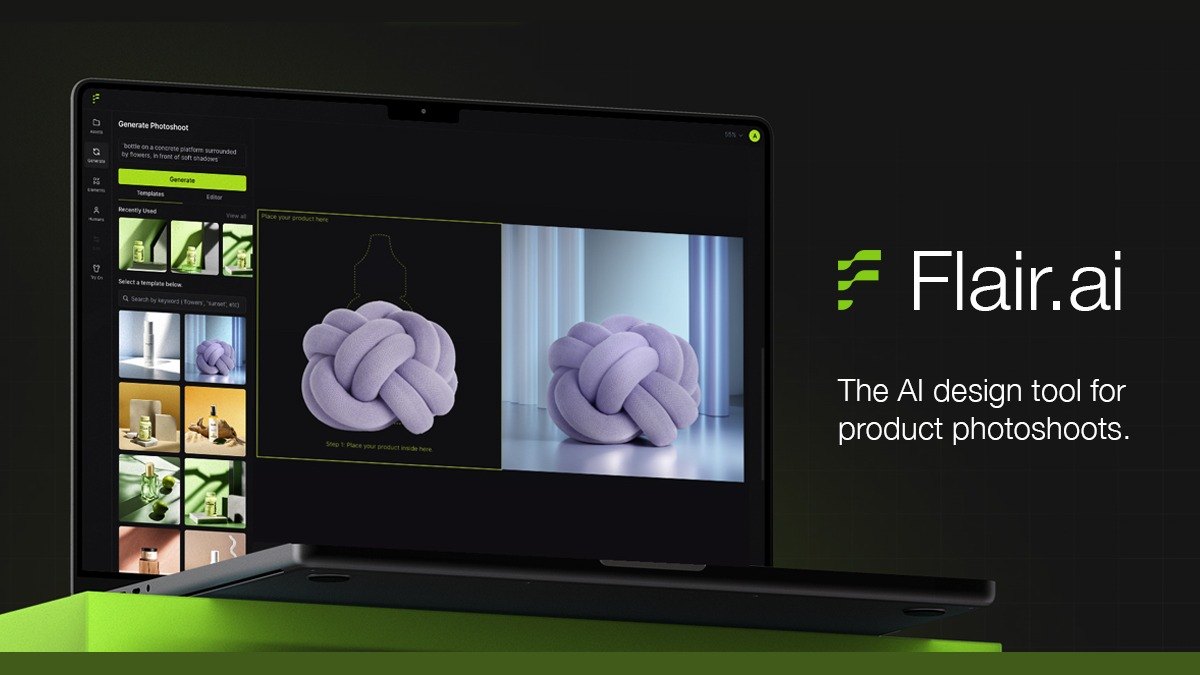
Flair.ai
Answrs VerdictCanvas-style scene staging, but the commercial license starts on the $26 tier.
Price: Free is $0; Pro is $8 a month; Pro+ is $26 a month; Scale is $38 a month; the page does not say whether these are the annual-discount figuresImage allowance: Free includes 5 generated images, Pro+ includes 80 and Scale includes 150Canvas: Its homepage describes staging scenes digitally with drag and drop props, then bringing them to life with AICommercial license: A Company Commercial License is listed on Pro+ and Scale, not on Free or Pro
Flair.ai Free is $0 with 5 generated images; Pro is $8 a month, Pro+ is $26 with 80 images and Scale is $38 with 150 images, and the page does not say whether those are annual-discount figures. Its homepage describes staging scenes with drag and drop props, then bringing them to life with AI. A Company Commercial License is listed on Pro+ and Scale.
Go ifDesigners who want to build scenes on a drag-and-drop canvas
Skip ifYou need a commercial license on the cheapest paid plan
Why #7 over #8: It offers a scene-building canvas, while soona bundles human shoots into its plans.
8
soona AI Studio
Answrs VerdictSuccessor to Mokker AI, with AI and human shoots under one membership.
Price: Basic membership is $13 a month billed annually and Standard is $49 a month billed annually; there is also a $149 studio fee per booking for non-membersAI Studio generations: 10 generations on the Studio pass, 20 a month on Basic and 84 a month on StandardBackground tools: Remove, change or blur background is listed as low resolution with a watermark on the Studio pass and as full access on Basic and StandardMokker: The Mokker AI site says Mokker AI is now the AI Studio of soona
The Mokker AI site says Mokker AI is now soona AI Studio. soona Basic membership is $13 a month billed annually and Standard is $49 billed annually, with a $149 studio fee per booking for non-members. AI Studio generations are 10 on the Studio pass, 20 a month on Basic and 84 a month on Standard.
Go ifBrands that want AI backgrounds now and the option to book a human photoshoot later
Skip ifYou want only an AI tool, since memberships also bundle studio and shoot services
Why #8 over #9: It adds human-shot photography to AI, while Canva is a general design suite.
9
Canva
Answrs VerdictGeneral design suite with a product background tool and a free way to try it.
Price: Free is $0; Pro is $144 a year for one person; Business is $250 a year per personAI Background Generator: Upload a product photo, enter a description and the Product Studio app creates a custom backdropFree access: Its AI background generator page is titled as free to use, and the Free plan lists limited access to Standard and Premium AIAI allowance: Pro lists 10x more AI than Free and Business lists 20x more
Canva Free is $0, Pro is $144 a year for one person and Business is $250 a year per person. Inside the editor, the Product Studio app creates a custom backdrop from an uploaded product photo and a description. The Free plan lists limited access to Standard and Premium AI, and Pro lists 10x more AI than Free.
Go ifPeople who already design in Canva and want quick product backgrounds
Skip ifYou want a product-photography-only workflow
Why #9 over #10: It publishes every price and has a free way to try the tool, while Hypotenuse AI does not.
10
Hypotenuse AI
Answrs VerdictCatalog-scale generation, but no published price.
Price: Not published; its pricing page lists Basic and Ecommerce Enterprise as CustomAI product photography: Generates every shot a catalog needs from a single product photo, including lifestyle scenes, on-model versions and multiple anglesLifestyle scenes: Generates 3-5 settings per product, with saved scene presetsAudience: The feature page is written for enterprise ecommerce teams
Hypotenuse AI does not publish a price; its pricing page lists Basic and Ecommerce Enterprise as Custom. Its AI product photography page says it generates every shot a catalog needs from a single product photo, including lifestyle scenes, on-model versions and multiple angles, with 3-5 settings per product. The page is written for enterprise ecommerce teams.
Go ifEnterprise catalog teams generating full image sets for many SKUs
Skip ifYou want a published price or a self-serve plan
How we ranked these
We ranked AI tools for product photography on three checks taken from each maker's own pages: a documented AI feature that places or restyles a product photo, a published price for the plan that includes it, and free or low-cost access. Ties go to the tool with more detail on its product-photo features. Where a price could not be read we say so, and no quality or sales claims come from outside the makers' pages. Three picks from the earlier list that we could not source as product-photography tools (Mokker AI, Booth.ai and Topaz Photo AI) are replaced by soona AI Studio, Shopify Magic and Hypotenuse AI. Facts are taken from each maker's own published information; check the official site before you buy.
Questions people ask
What is the best AI tool for product photography?
Photoroom ranks first: AI Backgrounds are on all three paid plans, Pro is listed at $7.50 a month billed yearly, and it offers a free trial. Adobe Firefly in Photoshop is #2 and Shopify Magic is #3.
Which AI product photography tools are free?
Shopify Magic media generation is free on all Shopify plans for a limited time. Pixelcut and Flair.ai list a $0 Free plan, Claid.ai has a Free plan with 50 credits, and Canva has a Free plan with limited AI access.
Which has the cheapest paid plan?
Photoroom Pro at $7.50 a month billed yearly, then Pixelcut and Flair.ai Pro at $8 a month. Pebblely Lite and Claid.ai Essentials are both $9 a month.
What happened to Mokker AI?
The Mokker AI site says Mokker AI is now soona AI Studio, which is why soona is listed here in its place.
Listed monthly price of the cheapest paid plan (Photoroom, Pixelcut and soona are annual-billing figures; Pebblely, Claid.ai and Flair.ai are monthly) at a glance
Photoroom7.5 USD
Pixelcut8 USD
Flair.ai8 USD
Pebblely9 USD
Claid.ai9 USD
soona AI Studio13 USD
Listed monthly price of the cheapest paid plan (Photoroom, Pixelcut and soona are annual-billing figures; Pebblely, Claid.ai and Flair.ai are monthly), as published by each maker. Picks without a published figure are left off.