What Is a Customer Health Score and How Do You Build One That Predicts Churn in 2027?
A customer health score is a single number or color that rolls several account signals, such as product usage, support history, survey results and engagement, into one view of how an account is doing. Gainsight calls it "a predictive metric" that "consolidates multiple inputs" into a single score. To build one that actually predicts churn, pick a small set of metrics, weight them by what really separated your churned customers from your renewed ones, set thresholds, and then check the score against real churn and revise it.
The last step is the one that makes it predictive. Gainsight advises using "historical data to assign weights based on what predicts churn or renewal," and Vitally lays out a review process built on tracking churned customers. A score you never test is only a label.
No source read for this page publishes a measured accuracy for any health score, or an industry benchmark for how well scores predict churn. Vendor descriptions say what their tools do, not how well a given score will perform at your company.
What a customer health score is
The idea is the same across vendors. ChurnZero describes health scores as a way to "measure and monitor the health of your customer accounts using the metrics you choose." HubSpot says its health scores "assign numerical values to records based on selected property values."
Scores can be shown as a color, a number or a tier. Gainsight says you can show the score as "color (like red/yellow/green), a number (0-100), or a tiered model," and an older Gainsight post lists numeric, letter and red-yellow-green schemes. The format is a presentation choice. What matters is what goes in and what the team does when the score moves.
What goes into a score
Gainsight groups common inputs into five families:
- Behavioral. Feature adoption and login frequency.
- Support. Ticket volume and resolution time.
- Relationship. Executive engagement and CS interactions.
- Financial. Renewals, invoice history and upsells.
- Feedback. NPS, CSAT and community activity.
ChurnZero's list is similar and adds license utilization, active contacts, time in app, journey progression and support details such as SLA issues and case severity. Gainsight's DEAR framework organizes inputs as Deployment, Engagement, Adoption and ROI.
How to build one step by step
- Choose a cadence. Gainsight asks whether scores should update daily, weekly or monthly. Vitally's docs say its scores are calculated on an hourly basis.
- Pick a few metrics. Gainsight says to "choose 4 to 6 key metrics that reflect customer engagement, value, and risk," and warns that "Tracking everything creates noise, but tracking too little misses key signals."
- Weight them. Gainsight says to "Assign a percentage to each one based on its impact," then multiply each metric by its weight and add them up. In Vitally, weights must add up to 100%.
- Set thresholds. Gainsight's example bands are Healthy (71-100), At Risk (31-70) and Critical (0-30). Vitally labels accounts Poor (0-3.3), Concerning (3.4-6.6) or Healthy (6.7-10) on a 0-10 scale. Your bands should come from your own data, not from a vendor example.
- Attach an action. Vitally says its tool can launch emails, tasks and alerts when a customer's health shifts, and ChurnZero says scores can drive alerts on score changes and prioritize upcoming renewals.
- Test, then revise. See the section on testing below.
Gainsight's own example weighting, usage 40%, support 25%, sentiment 20% and executive engagement 15%, is labeled as an illustration. It is not a benchmark, so do not copy it as if it were.
What a real weighted score looks like
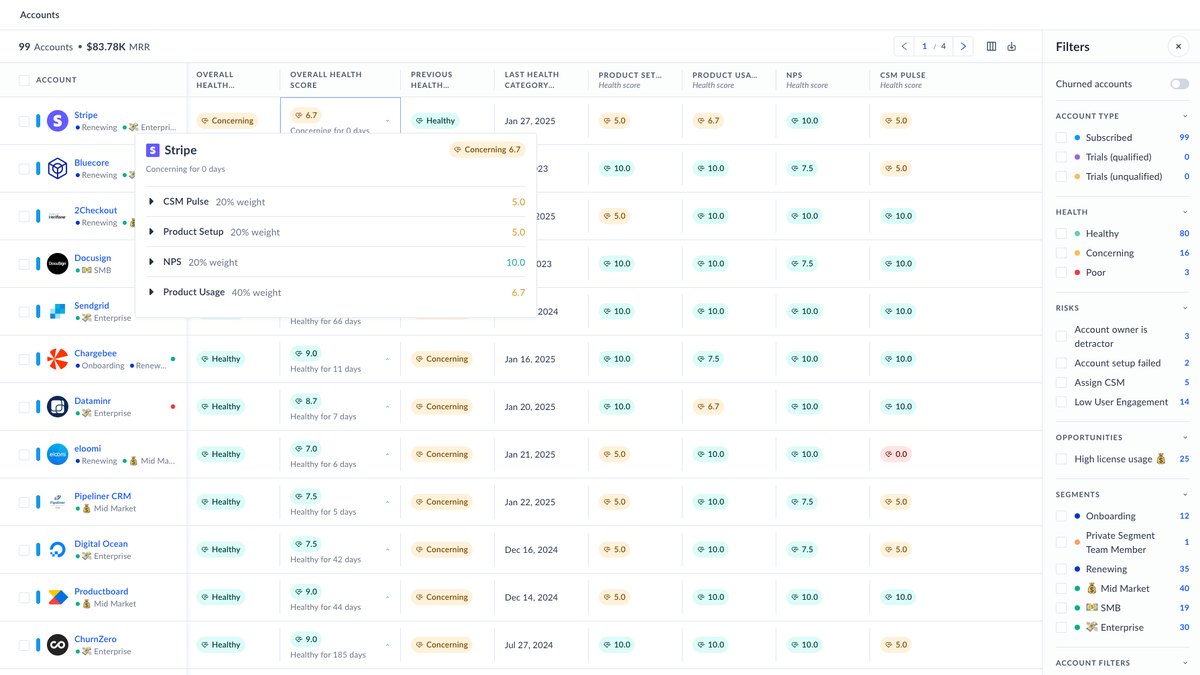
The screenshot at the top of this page comes from Vitally's help documentation. In it, an example account's overall score of 6.7, labeled Concerning, is built from four parts: a CSM-based score at 20% weight, Product Setup at 20%, NPS at 20% and Product Usage at 40%. Vitally says an account's overall health is "a weighted average of each health score." The accounts shown are sample data from the vendor's docs, and the weights are an example of how the tool displays a breakdown, not a recommendation.
The point of the breakdown view is diagnosis. When an account turns Concerning, the team can see which input pulled it down instead of guessing.
Segment the score so it fits the customer
A single formula for every account is a common failure. Gainsight says "A one-size-fits-all health score doesn't work." ChurnZero recommends separate scores for customer sizes (SMB, mid-market, enterprise), lifecycle stages, industries and regions.
Vitally argues for scoring by lifecycle stage, with stages Onboarding, Adoption, Maturity and Renewal, because "a customer's behavior changes as they mature with your product." Its example is that in onboarding, whether a customer has set up key modules or integrations may matter more than usage volume. HubSpot's builder lets you apply a score to company or contact segments, up to 5 per score.
How to test whether it predicts churn
Vitally's five-step process starts with tracking churn: cancellation, the reason for cancellation, and win-back probability. Next, define the churned segment as customers who left within a timeframe that fits your business, such as the last three months, six months, or the last year. Then add relevant data fields, review how the scores of churned and retained customers compare, and report, iterate and repeat.
Vitally gives a rule of thumb for re-checking: "quarterly for very young SaaS companies and at least yearly for more mature businesses." Gainsight adds that "Customers change, and your score should, too." Vitally also says you can preview how score rules would affect real accounts before going live.
Common mistakes
- Too many metrics. Gainsight warns that tracking everything creates noise.
- Guessed weights. Gainsight says to use historical data to set weights based on what predicts churn or renewal.
- Manual, subjective inputs. Gainsight says "Overusing manual updates leads to inconsistency."
- No segmentation. One formula for every customer type, as covered above.
- No owner or action. A score nobody acts on does not reduce churn. Tie each threshold to a playbook.
Where to build one
Dedicated customer success platforms such as Gainsight, ChurnZero and Vitally build health scoring in. HubSpot offers it in the customer success workspace with Service Hub Professional or Enterprise and a Service Seat, and says you can create up to 50 health scores, with multiple scores per account an Enterprise feature. Plan limits change, so confirm them on the vendor's page before you buy. This page does not rank these tools.
Questions people ask
What is a customer health score?
A single number, color or tier that combines signals such as product usage, support history, NPS and engagement into one view of account health. Gainsight calls it a predictive metric that consolidates multiple inputs into a single score.
How many metrics should a health score use?
Gainsight says to choose 4 to 6 key metrics, and warns that tracking everything creates noise while tracking too little misses key signals.
How do I know if my health score predicts churn?
Compare it against real churn. Vitally's process is to track churned customers and their reasons, define the churned segment over a set timeframe, add relevant data fields, review the scores, then iterate. No source read here publishes a measured accuracy for a health score.
How often should I update the model?
Vitally's rule of thumb is quarterly for very young SaaS companies and at least yearly for more mature businesses.
Should every customer use the same score?
No. Gainsight says a one-size-fits-all score does not work, and ChurnZero recommends separate scores by customer size, lifecycle stage, industry and region.
Sources
- Gainsight: Customer Health Score Explained · Definition, steps, inputs, warnings
- Gainsight Community: DEAR framework · Deployment, Engagement, Adoption, ROI
- Gainsight: Scorecards: Quantifying Customer Health · Scoring schemes and weights
- ChurnZero: Customer health score · Inputs and segmentation
- HubSpot Knowledge Base: health scores in the customer success workspace · Setup, groups, decay, limits
- Vitally docs: Health scores · Scale, weights, hourly calculation, hero screenshot
- Vitally: health scores by lifecycle stage · Stage-based scoring
- Vitally: measure if your health score is working · Testing against churn
- Vitally: Customer Health Score Software · Alerts and preview before going live
Health scores are only as good as the checking behind them. Build a simple one, compare it with the customers you actually lost, and adjust. This page is general information, not advice for your specific business.