What Is Model Quantization and When Should You Use It in 2027?
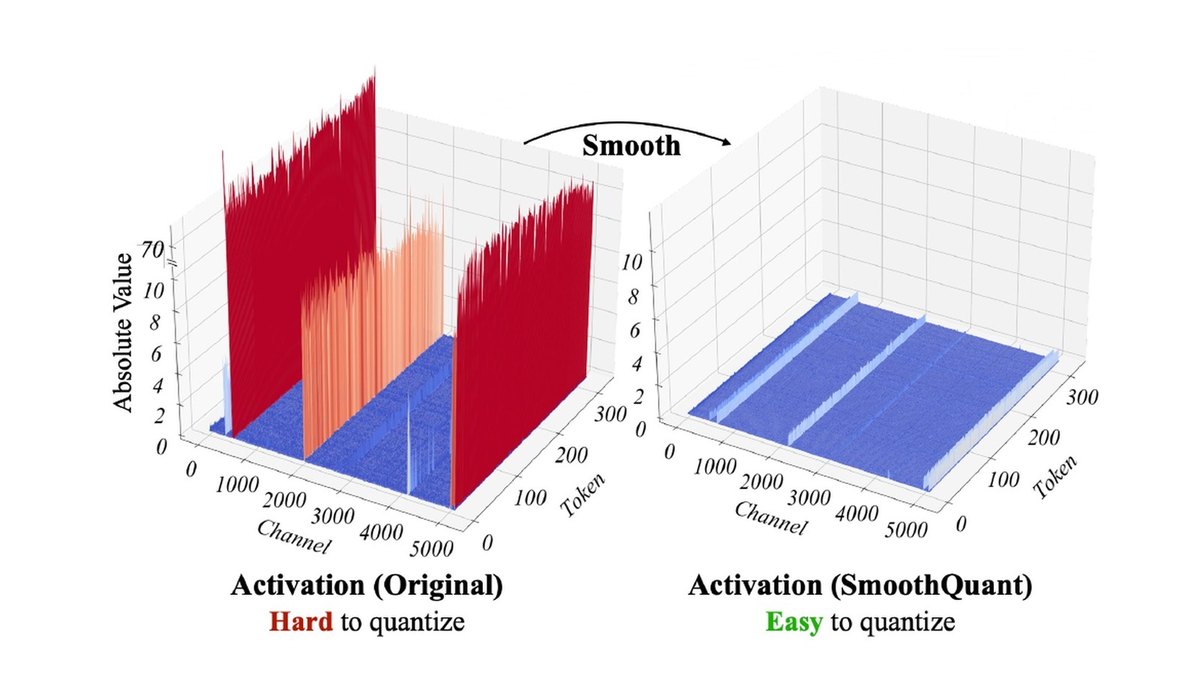
Model quantization stores a model's weights, and sometimes its activations, in fewer bits so it needs less memory. The Hugging Face Transformers docs put the math simply: models usually load in bf16 at 2 bytes per parameter, so an 8B model needs about 16GB for its weights, about 8GB at 8 bits and about 4-5GB at 4 bits.
Use it when the model does not fit the memory you have, when you serve enough traffic that memory per request sets your cost, when you run models locally on a laptop or phone, or when you want to fine-tune a large model on one GPU (QLoRA). Be careful below 4 bits, on hardware without support for the format you pick, and in any task where small accuracy losses matter. The Hugging Face benchmarks summarize the trade-off: 8-bit is very close to bf16, 4-bit is high, and below 4 bits there is a noticeable drop.
The figures on this page come from the Hugging Face and llama.cpp documentation, an NVIDIA technical blog, a PyTorch blog and the GPTQ, AWQ, LLM.int8(), SmoothQuant and QLoRA papers. They are the authors' own results on their own models and hardware.
What quantization actually does
A trained model is mostly a huge set of numbers. Quantization maps those numbers onto a smaller set of values that fit in fewer bits, plus a scale (and sometimes a zero point) that maps them back. The llama.cpp quantize README describes it as reducing the precision of model weights, for example from 32-bit floats to 4-bit integers, which shrinks the model and can speed up inference.
The cost is accuracy. The same README says the loss is usually measured in perplexity and/or Kullback-Leibler divergence against the original model. The Transformers overview adds that each method makes a different trade-off between memory, speed and accuracy, which is why there are so many of them: Transformers alone integrates more than 20 quantization methods through from_pretrained().
Why it speeds things up: generating each new token means reading the model's weights from memory, so fewer bytes per weight means less data to move. For the latency side of that story, see what causes high LLM inference latency; for the cost side, how to reduce GPU costs when serving large language models.
The three choices behind every quantization method
- What gets quantized. Weight-only methods (such as GPTQ and AWQ) shrink the stored weights and are the usual choice when memory is the limit. Weight-and-activation methods (such as SmoothQuant's W8A8, 8-bit weights and 8-bit activations) also run the matrix math in low precision, which needs hardware support. The KV cache can be quantized too; the Transformers docs point to a quantized cache for long generations.
- When it happens. Post-training quantization (PTQ) converts a finished model, often with a small calibration dataset. Quantization-aware training (QAT) simulates the low-precision numbers during training or fine-tuning so the model learns to tolerate them. PTQ is cheaper; QAT usually keeps more accuracy.
- Which number format. Integers (INT8, INT4) or low-bit floats (FP8, MXFP4, NVFP4), and how many values share one scale. Smaller blocks per scale track the data more closely but cost a little extra storage.
Most of the practical choices come down to these three. The papers below are the ones the common tools are built on.
The methods that made LLM quantization practical
- LLM.int8() (NeurIPS 2022)Int8 matrix multiplication that halves inference memory with full-precision performance; outlier features go to a 16-bit path while more than 99.9% of values are multiplied in 8-bit
- SmoothQuant (ICML 2023)Training-free W8A8 PTQ that moves outlier difficulty from activations to weights; up to 1.56x speedup and 2x memory reduction with negligible accuracy loss
- GPTQ (ICLR 2023)One-shot weight quantization using approximate second-order information; quantizes 175-billion-parameter models in about four GPU hours down to 3 or 4 bits per weight
- AWQActivation-aware weight-only quantization; protecting only 1% of salient weights greatly reduces quantization error, with no backpropagation or reconstruction
- QLoRAFine-tunes a 65B model on a single 48GB GPU through a frozen 4-bit model, using the 4-bit NormalFloat (NF4) data type and double quantization
The papers explain why naive rounding breaks large models. The LLM.int8() paper by Dettmers et al. found highly systematic emergent outlier features that dominate attention and predictive performance, and isolates them in a 16-bit matrix multiplication. SmoothQuant by Xiao et al. starts from the observation in the hero image: weights are easy to quantize while activations are not, so it applies a mathematically equivalent transformation that shifts the difficulty to the weights.
GPTQ by Frantar et al. made 3- and 4-bit weights accurate enough to run a 175-billion-parameter model inside a single GPU. AWQ by Lin et al. picks the salient weight channels by looking at activations rather than weights, and scales them up instead of keeping them in mixed precision. QLoRA by Dettmers et al. carried quantization into fine-tuning.
Number formats in 2027: INT8, INT4, FP8 and FP4
Integer formats still dominate weight-only quantization, but floating-point formats have taken over on new data center GPUs because the hardware runs them natively. The format you can use depends on the chip. The Transformers method guide lists the requirements:
- Fine-grained FP8. Needs CUDA compute capability 8.9 or higher (Ada and Hopper), or an Intel XPU. FBGEMM FP8 needs compute capability 9.0 or higher.
- NVFP4. NVIDIA's 4-bit float format for Blackwell; in Transformers it runs on one Blackwell GPU.
- MXFP4. Runs on compute capability 7.5 or higher, XPU and CPU in Transformers.
- Apple silicon. The Metal method quantizes to 2, 4 or 8 bits on MPS while loading, and GGUF files also load on MPS.
NVIDIA's NVFP4 introduction (June 24, 2025) explains how the 4-bit float formats differ. Each value has 1 sign, 2 exponent and 1 mantissa bit. MXFP4 shares one power-of-two scale per 32-value block. NVFP4 uses a finer E4M3 FP8 scale per 16-value block plus a second-level FP32 scale per tensor, which NVIDIA says gives twice as many chances to match the local range of the data.
- Storage cost4.5 bits per value including the FP8 block scale
- Memory, per NVIDIAAbout 3.5x smaller than FP16 and about 1.8x smaller than FP8
- Accuracy, per NVIDIA1% or less degradation on key language modeling tasks for DeepSeek-R1-0528 quantized from FP8 to NVFP4 with PTQ
- Tools namedTensorRT Model Optimizer and LLM Compressor to quantize; TensorRT-LLM and vLLM to serve
GGUF and llama.cpp: quantization for local machines
If you run models on a laptop, desktop or Mac, you will mostly meet quantization as GGUF files. GGUF is the llama.cpp format; the Transformers docs describe it as a single file that holds the weights, config and tokenizer. The llama.cpp workflow has two phases: convert the original model to GGUF, then quantize the GGUF file with llama-quantize, for example to Q4_K_M. Hugging Face also hosts a GGUF-my-repo Space that builds quants without any setup.
- Llama 3.1 8B32.1 GB original, 4.9 GB at Q4_K_M
- Llama 3.1 70B280.9 GB original, 43.1 GB at Q4_K_M
- Llama 3.1 405B1,625.1 GB original, 249.1 GB at Q4_K_M
- Bits per weight (Llama 3.1 8B)Q4_K_M 4.8944, Q5_K_M 5.7036, Q6_K 6.5633, Q8_0 8.5008, F16 16.0005
The README's options carry practical advice. An importance matrix (--imatrix) reduces the accuracy loss. Requantizing an already-quantized file is allowed but, the README warns, can severely reduce quality compared with quantizing from 16-bit or 32-bit, so start from the original weights. Multimodal encoders and projectors are usually kept in a high-quality format such as bf16 or q8, because they are small and their quality directly affects the model's output.
Which method to start with
If your checkpoint is already quantized, the checkpoint decides the method. Otherwise the Transformers method guide recommends a first method by goal:
- Fit a model in less memory with the least setup: bitsandbytes, 4 or 8 bits while loading, no calibration.
- Fine-tune with QLoRA: bitsandbytes, which supports 4-bit NF4 with PEFT.
- Speed up inference with torch.compile: torchao, with int4, int8 and FP8 schemes.
- Best 4-bit accuracy: GPTQ, which calibrates on a dataset while loading; AWQ and AutoRound checkpoints are made with their own libraries and then loaded.
- FP8 on Ada, Hopper or Intel XPU: fine-grained FP8. FP4 on Blackwell: NVFP4.
- Below 4 bits: HQQ or SINQ for 2 or 3 bits without calibration; AQLM, VPTQ and SpQR go lower but must be quantized with their own libraries.
The same page reports benchmarks on Llama 3.1 8B and 70B, and groups the results in three bit ranges: 8-bit methods are about 2x smaller than bf16 and very close to it in accuracy; 4-bit methods are about 4x smaller with high accuracy, where AWQ and GPTQ often lead but need calibration; below 4 bits models get more than 4x smaller with a noticeable drop, especially at 2 bits.
When you should quantize
- The model does not fit. This is the clearest case. Going from bf16 to 4 bits cuts weight memory roughly 4x, which can turn a multi-GPU deployment into a single-GPU one, as GPTQ did for a 175-billion-parameter model.
- You serve at volume. Smaller weights leave more GPU memory for the KV cache and bigger batches. On FP8 or FP4 hardware the math itself also runs in low precision, as with SmoothQuant's W8A8.
- You run on a laptop, phone or edge device. AWQ's authors built TinyChat for 4-bit on-device models and report more than 3x speedup over the Hugging Face FP16 implementation on desktop and mobile GPUs. For the broader picture, see how to deploy AI models at the edge.
- You want to fine-tune a big model cheaply. QLoRA fine-tunes through a frozen 4-bit model on one GPU while, per its authors, preserving full 16-bit fine-tuning task performance.
When to hold back, or use QAT instead
- Below 4 bits. Every source above shows the drop growing as bits fall. GPTQ reports reasonable accuracy at 2-bit or ternary levels, which is a lower bar than negligible.
- Your hardware lacks the format. FP8 and NVFP4 need recent GPUs. Without native support you may save memory but not time.
- Small errors are expensive. Code, math, long reasoning chains and regulated outputs deserve a full evaluation. The Transformers guide says to benchmark accuracy and speed on your own task and hardware before you pick a method for production.
- PTQ loses too much. Use quantization-aware training. In a PyTorch blog post (July 30, 2024), the torchao team reports QAT recovered up to 96% of the accuracy degradation on hellaswag and 68% of the perplexity degradation on wikitext for Llama3 compared with PTQ, at the same model size.
A sensible order: try 8-bit (or FP8 on supported GPUs) first, since it is close to lossless in the Hugging Face benchmarks. Move to 4-bit with a calibrated method such as AWQ or GPTQ, or NVFP4 on Blackwell, if you need the memory. Measure perplexity or KL divergence and, more importantly, your own task metrics against the unquantized model at each step, and keep the step before the one where quality drops.
Questions people ask
What is model quantization in simple terms?
It stores a model's numbers in fewer bits, for example 8 or 4 instead of 16, so the model takes less memory and often runs faster. The Hugging Face docs give the example of an 8B model needing about 16GB in bf16, about 8GB at 8 bits and about 4-5GB at 4 bits.
Does quantization reduce accuracy?
Usually a little, and more as bits fall. Hugging Face's benchmarks on Llama 3.1 found 8-bit very close to bf16, 4-bit high, and a noticeable drop below 4 bits, especially at 2 bits. Always test on your own task.
Is 4-bit or 8-bit better?
8-bit keeps more accuracy and 4-bit saves more memory, about 4x versus bf16 instead of about 2x. Start with 8-bit and move to 4-bit with a calibrated method such as GPTQ or AWQ if you need the room.
What is the difference between FP8, MXFP4 and NVFP4?
FP8 is an 8-bit float format that needs compute capability 8.9 or higher in Transformers. MXFP4 and NVFP4 are 4-bit floats; NVIDIA says MXFP4 shares a power-of-two scale per 32 values, while NVFP4 uses an FP8 scale per 16 values plus a per-tensor scale, for about 4.5 bits per value.
What does Q4_K_M mean in a GGUF file name?
It is a llama.cpp quantization type. In the llama.cpp README it averages 4.8944 bits per weight on Llama 3.1 8B and shrinks that model from 32.1 GB to 4.9 GB.
What is the difference between PTQ and QAT?
Post-training quantization converts a finished model. Quantization-aware training simulates quantization during training so the model adapts to it. PyTorch reports QAT recovered up to 96% of the hellaswag accuracy degradation PTQ caused on Llama3.
Sources
- Hugging Face Transformers: Quantization overview · memory math, GGUF loading
- Hugging Face Transformers: Choose a method · methods, hardware, benchmark summary
- llama.cpp: quantize README · GGUF workflow, sizes, bits per weight
- NVIDIA: Introducing NVFP4 for Efficient and Accurate Low-Precision Inference · NVFP4 and MXFP4 formats
- Dettmers et al.: LLM.int8() · 8-bit inference and outlier features
- Xiao et al.: SmoothQuant · W8A8 quantization; source of the top image (CC BY 4.0)
- Frantar et al.: GPTQ · 3 and 4-bit weight quantization
- Lin et al.: AWQ · activation-aware weight quantization
- Dettmers et al.: QLoRA · 4-bit fine-tuning and NF4
- PyTorch: Quantization-Aware Training for Large Language Models with PyTorch · QAT versus PTQ results
Figures were read from the linked pages on November 3, 2026. Formats, hardware support and tool defaults change quickly, and every benchmark here is its authors' own, so check the current docs and evaluate on your own model, prompts and hardware before you ship a quantized model.